
Table of Contents
The expert problem most platforms ignore
You've uploaded that same headshot six times.
Once for your course. Once for your sales page. Once for the email welcome sequence. Once for the about section on your site. Once for the membership homepage. Once, when you needed it again three months later, because you couldn't find the original.
The image is exactly the same. The work of getting it onto your platform had to be repeated every time. What should be an easy task turns into an annoyance each time.
This is what running a media-rich online business actually looks like underneath. Lots of uploading. Lots of finding the file you uploaded last week, and wondering if it's the right version. Lots of tab switching to resize a banner because the canvas you uploaded is too large for the placement. Lots of "where did I put that?"
If you're a visual-first expert, the cost is even higher. A surface pattern designer might have dozens of pattern files in every collection. Every product page, every newsletter, every landing page draws from the same library of work. When that library is scattered across course builder uploads, an email designer, a community page, and a landing page tool, the daily cost of running the business adds up.
Most experts have learned to live with this. They build personal organization systems on top of the platform. They keep separate folders on their desktop. They name files like headshot-final-v3-USE-THIS-ONE.jpg. They redo work because the work itself is faster than searching for the original.
This cycle, we shipped a Unified Media Library that changes the math. Every image, every video, every document an expert has ever uploaded to Kajabi now lives in one place, is available to use anywhere on the platform, and can be edited without ever leaving the page.
Why media keeps ending up everywhere
Most online business platforms grew up product by product. The course builder got an image uploader. The email designer got its own image uploader. The landing page builder got one. The community got one. Each built independently, each with its own conventions, each disconnected from the others.
The result is what most online businesses look like today. Assets are stored everywhere there's an uploader, so they're not really organized anywhere in particular. A photo lives in your course thumbnails, your sales page hero, your welcome email, and three different landing pages, but each one is its own upload. Instead of a library, what most experts have is a sprawl.
When the platform doesn't unify your media, three things happen.
First, you do the work that the platform should do. You name files carefully because nothing else helps you find them later. You keep external folders organized so you can find originals when you need them. You upload the same image four times because you don't trust that the previous upload is still there in the right place.
Second, your assets drift out of sync. The headshot updates on your course page but stays old on your sales page. The product photo gets the right edit on the landing page, while the email keeps showing the previous version. Your business presents a slightly different version of itself in every placement, which is a small problem until it becomes a brand problem.
Third, performance becomes invisible. You have no way to see how an asset works across placements. The intro video might be carrying your sales page and getting ignored on the course welcome page, and you'd never know. Different upload, different file, different stats wherever you happen to look.
The unified library required rethinking how every product on the platform connects to media. The cost of not having one was paid by every expert, on every single day they ran their business. This time we made the trade.
What we believe your media library should do
Your media is your IP.
The video where you explain your framework. The headshot that opens every course. The pattern files that become licensing collections. The recipe photos that anchor a cookbook. The exercise demos that drive a fitness program. These are the work itself, captured in a form your audience can experience.
The platform you build on should treat them that way: as one organized library of the things you've made, available to every part of your business, with one source of truth for every file.
This belief sits inside a broader principle that runs through how we build at Kajabi: the tools should match the work. A media-led expert business shouldn't have to bolt media organization onto a platform that wasn't built for it. The platform should be the organization.
That's the thinking behind the Unified Media Library. Five capabilities that move the platform from a place where you upload files to a place that holds your media as a real asset.
What's new in Kajabi Media Library
This cycle, the Media Library shipped as a unified place for every image, video, and document an expert uploads to Kajabi. Five capabilities make it useful day-to-day.
One library for every asset
Every image you've uploaded to a course thumbnail, every video you've embedded in a sales page, every document you've offered as a lead magnet, every audio file you've used in a podcast course. All in one library. Browse by file type, search by name, and filter to find what you're looking for.
This matters less for what it adds and more for what it removes. There's no longer a "maybe it's in the email tool, or maybe in the course builder, or maybe in the membership upload." Files have one home. You go there to find them.
Tagging, sorting, and saved custom views
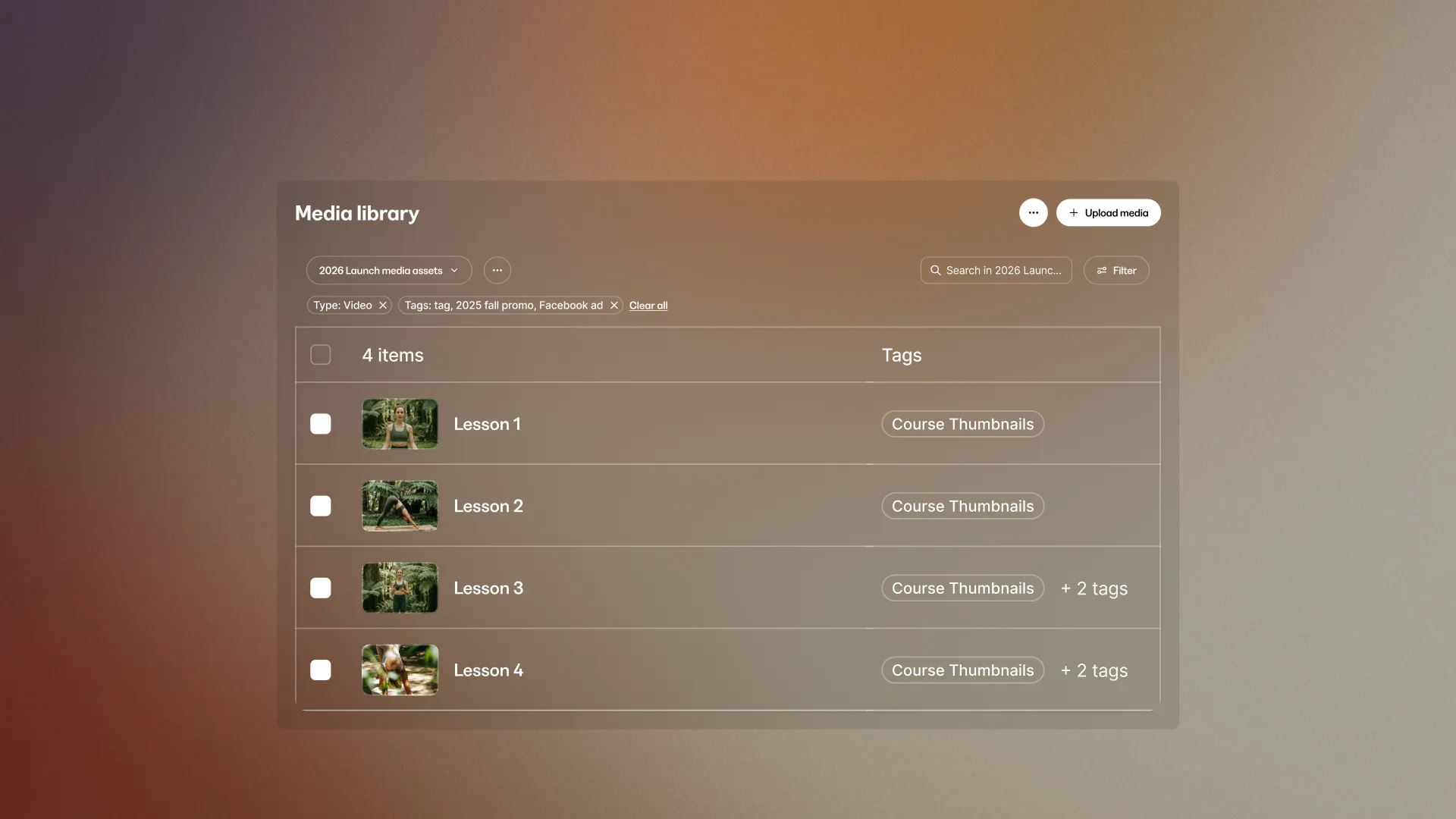
Inside the library, tag assets with labels you define. Sort by name, file type, upload date, or last used. Combine tags and sorts into custom views you save and return to.
A Course Thumbnails view tagged for every thumbnail across your courses. A Landing Page Heroes view for the banner images you use across funnels. A Podcast Cover Art view for every episode graphic. You define the categories that match how you actually run your business and save them once. The library follows your structure. Next time you open it, pick the view, and the right assets are already filtered for you.
Use anywhere across Kajabi
When you're building a landing page, an email, a course, or a community post, the media picker now opens directly into your library. Pick from what you already have. The asset you choose is linked from the library, so the same file shows up in the new placement.
This is the real shift. One file, used everywhere it needs to be used. If you replace the original in the library, all placements update. If you decide the headshot needs an update on your sales page, you update it once, and the email, the course, and the membership homepage all reflect the change.
Edit in-place with Adobe Express
Most of the time, the asset you have isn't quite the size you need. The banner that looks great as a square needs to be resized for a wide hero. The full-resolution photo needs to be scaled down for a mobile email.
The Media Library now includes Adobe Express directly. Pick the file. Click "Edit image with AI" or use the resize tool. Make the edit. Save. The new version appears in the library and is available to use anywhere.
No Canva tab. No re-export. No re-upload. The full Adobe Express toolkit, including AI-assisted editing, runs inside Kajabi, on the file that's already in your library.
Per-placement analytics
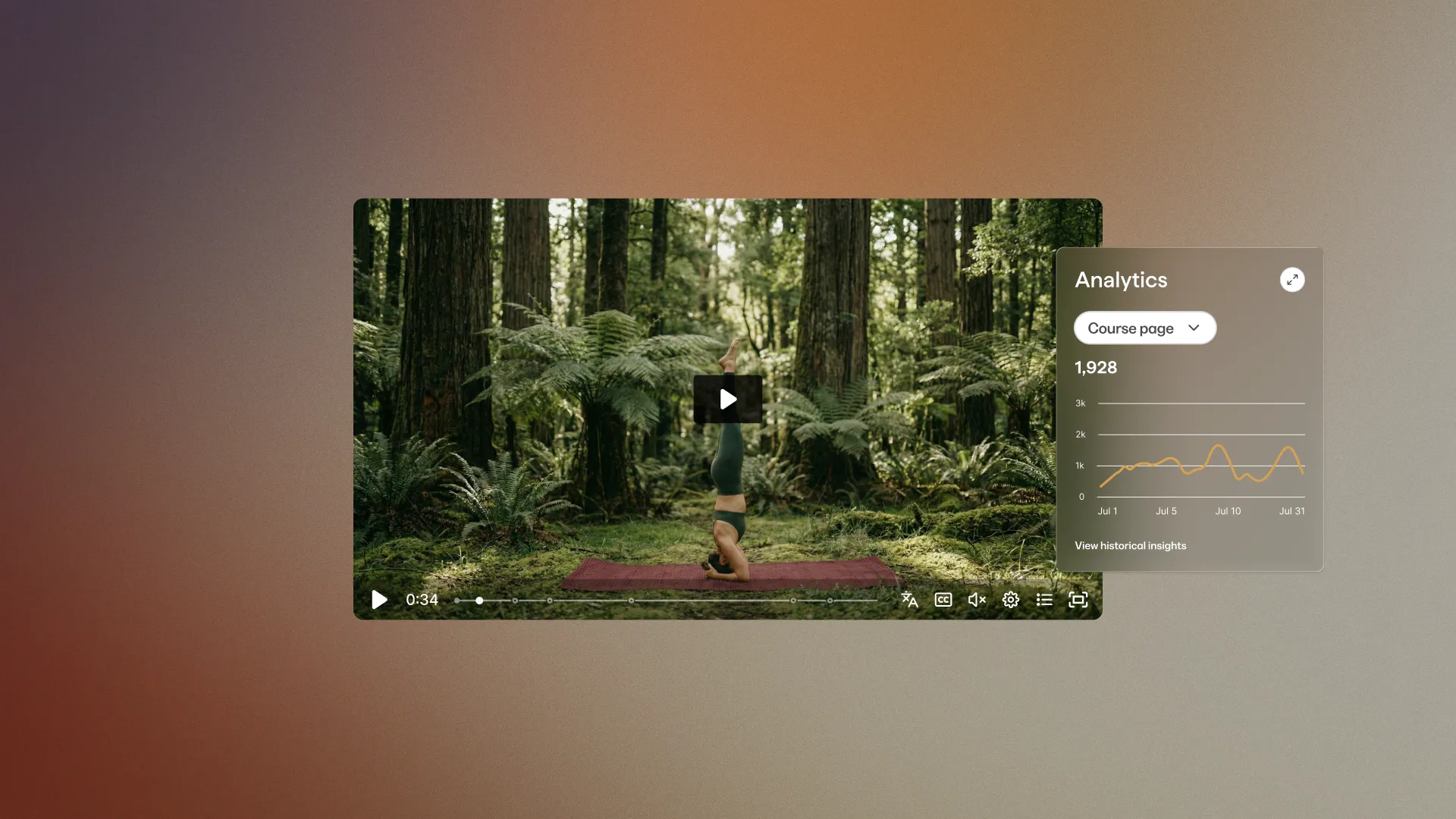
For videos, especially, the same file performs differently in different places. Your intro video might be doing serious work on the sales page, only to get buried on the course welcome page. Your testimonial video might land on the blog post and get scrolled past in the email.
Per-placement analytics shows you that distinction. Open a video in the library and see a panel breaking down views by placement: how many on the sales page, how many on the course welcome, how many on the blog post. One video. Every placement. One view of the picture.
For experts running multi-channel businesses with the same content surfaced in different ways, this is the data that's been missing. You know what content you have. Now you know what each piece of content is actually doing for you.
Tip: Spend ten minutes tagging your most-used assets and setting up two or three custom views the first time you open the library. Course Thumbnails, Email Headers, Podcast Covers, whatever matches the rhythms of your business. The time you save on the second day forward compounds.
Who these updates are built for
Different experts will get different value from the Unified Media Library. A few scenarios where the changes matter most.
Visual-first experts. Photographers, surface pattern designers, illustrators, fine artists, designers, and anyone whose business is built around images. Take a US-based surface pattern designer at the $10M milestone, teaching artists how to create licensing-ready prints for fabric, wallpaper, stationery, and home goods. Every collection has dozens of pattern files. Every course module, email, and licensing page draws from those files. A unified library where every collection lives once and gets used everywhere is the kind of operational upgrade that compounds across thousands of daily decisions.
Video-led experts. Filmmaking instructors, fitness coaches with exercise libraries, music educators with lesson recordings, and podcasters with course-style content. Per-placement analytics is the unlock. The same video does different work on the sales page, in the course welcome, and on the blog. Now experts can see the difference and decide what to keep, replace, or move.
Multi-product businesses. Experts running a course, a community, an email list, and a landing page or two. The Adobe Express integration takes minutes back from every "I need that resized for X" task. The cross-platform reuse means a brand refresh updates everywhere with one swap, not eight.
Growing libraries. As an expert business matures, the asset count grows from dozens into hundreds. Tagging and saved custom views are what make that scale livable. The same library that worked at year one keeps working at year five, organized the way your business has actually evolved.
If your business runs on media, this set of updates is the kind of upgrade that shows up not as a new feature you noticed, but as a friction that quietly disappeared.
How to get started today
The Unified Media Library is live. There's nothing to enable. The fastest way to try it:
- Open Media Library from your dashboard.
- Browse what's already there. Most experts find more than they remembered uploading.
- Tag a handful of assets and save one or two custom views that match how you actually work.
- Open one of your videos and check the per-placement analytics panel.
- Try editing an image in Adobe Express directly from the library.
Spend ten minutes inside the library. The kind of operational upgrade this is takes effect the moment you start using it as the home for your media.
The library is the foundation for more to come. The bigger picture: the work you do is in the assets. The platform you build on should make the assets work harder. That's what this cycle's library is doing.